YouTube Live Stream Thumbnail Downloader
Grab the thumbnail from any YouTube live stream or premiere — no signup, no watermark. Works exactly like our main thumbnail downloader, just built for live content specifically.
Paste a link to get started
No account, no watermark — just the thumbnail.
How It Works
Paste the link to a live stream, premiere, or a recently-ended broadcast, and pick the resolution you need. Live thumbnails can update while a stream is running, and the full-resolution version sometimes only appears after the broadcast ends — that's normal YouTube behavior, not something wrong with the tool.
Copy the video link
Open the broadcast or its replay in YouTube. Use Share → Copy link, or copy its full address from your browser.
Paste it into ThumbGrab
Paste the URL into the box above. A preview check starts on paste; you can also select Get Thumbnail.
Save the image
Choose an available result and select Download. Look for the saved image in your browser’s downloads. Copy URL copies a link instead of saving the file.
Illustrations of the steps. YouTube’s sharing controls may look different on your device.
Tested example: a live-stream example
Checked
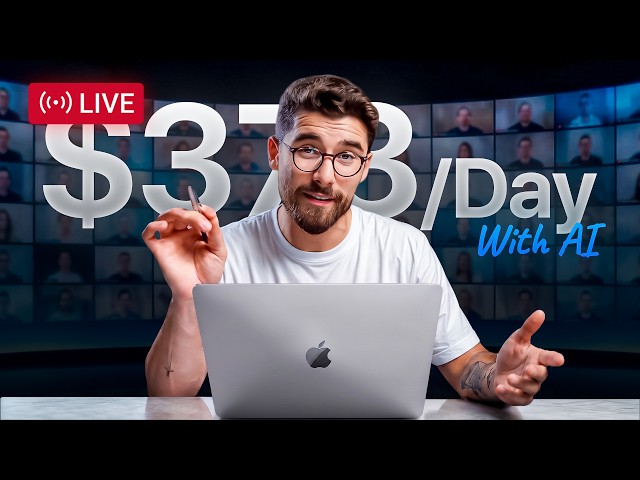
Let's Start a $373/Day Side Hustle Together (LIVE)
This example uses a public /live/ link from Iman Gadzhi’s broadcast. The link was entered into this page’s downloader. Its Standard Quality download link returned a JPEG, and the saved image was opened to check its contents.
This image records the thumbnail available when the live-stream example was checked. A later download may look different if the creator changes it.
To repeat the check, copy this URL, paste it above, and download the Standard Quality result:
https://www.youtube.com/live/MTZwSjiDg30?si=nvvIW75pYN1c7jdYThis is a dated example, not a guarantee of future availability. The file download was verified separately; inline YouTube previews did not finish loading in the test browser.
Frequently Asked Questions
Can I download the thumbnail while the stream is still live?
Yes — paste the link at any point during the broadcast. Keep in mind the thumbnail itself can change while a stream is live, so what you download reflects that exact moment, not necessarily the final one.
Why is max resolution missing right after a stream just ended?
YouTube sometimes needs a short amount of time after a broadcast ends to generate the full-resolution thumbnail. Our guide on missing max resolution thumbnails.
Does this work for premieres too?
Yes — a scheduled premiere behaves the same way a live stream does before it has fully finished airing.
Can I get a 4K thumbnail downloader for a YouTube live stream?
You’ll get the highest resolution YouTube actually generated for that stream — the same rules apply as any other video, live or not. True 4K thumbnails don’t actually exist on YouTube — see why in our guide on 4K YouTube thumbnails.
Downloading from a Short instead? Try our Shorts thumbnail downloader.