Ready to save a crop? Open the thumbnail downloader, paste your video link, then choose Edit / Crop under a result to open the YouTube thumbnail cropper. Select 9:16 or 16:9, adjust the position and zoom, and download the cropped JPG. For phone save locations, see the iPhone and Android guide.
Why YouTube Thumbnails Have Black Bars—and What Cropping Changes
A downloaded YouTube thumbnail can contain black bars even when the video is widescreen. The image may include padding to fit a different aspect ratio, or the page displaying it may add empty space. A cropped preview has the opposite effect: part of the image is hidden so it fills a frame.
First, Open the Image by Itself
Use Copy URL beside a result in the thumbnail downloader, then open that link in a new tab. Or open your saved file in an image viewer. Compare its edges with the preview on the website. The thumbnail-URL guide shows where to find the direct image address.
| What you see | What it tells you | What to do |
|---|---|---|
| Bars inside the saved image’s boundaries | The padding is part of that file. | Compare another variant or crop a copy. |
| Extra space only around the image on a page | The display frame has a different shape. | Adjust the frame or image-fit setting. |
| Faces or text missing only in the preview | The display is probably cropping the image. | Choose a fit/contain option or adjust the crop position. |
YouTube’s thumbnail documentation explains that resizing an upload to the required dimensions preserves its aspect ratio and may add black bars. That is one reason a working image link can return a padded thumbnail.
Real Example: A 4:3 File With Widescreen Artwork
On 6 September 2026, we downloaded the Standard Quality JPEG for this live-stream example. It measured 640×480 pixels. The image below shows its full canvas beside a centered 16:9 display crop of the same saved file.

A 640-pixel-wide 16:9 crop is 360 pixels tall: 640 × 9 ÷ 16 = 360. Centering it in a 480-pixel-tall image removes 60 pixels from the top and 60 from the bottom. That fits the bars in this example; do not assume every image has the same border. Both previews above use the original file. The crop is applied only to its display.
We also checked this video’s maxresdefault and mqdefault files, which were 16:9 without those top and bottom bars. Compare all five files in the thumbnail-size guide before deciding to crop. Choosing a suitable existing variant can be simpler.
Why Does a Downloaded Shorts Thumbnail Look Landscape?
A vertical video and its downloadable thumbnail do not have to use the same canvas. In our MrBeast Short example, the saved 640×480 JPEG includes extra image panels on both sides. The vertical preview hides those panels with a centered crop.
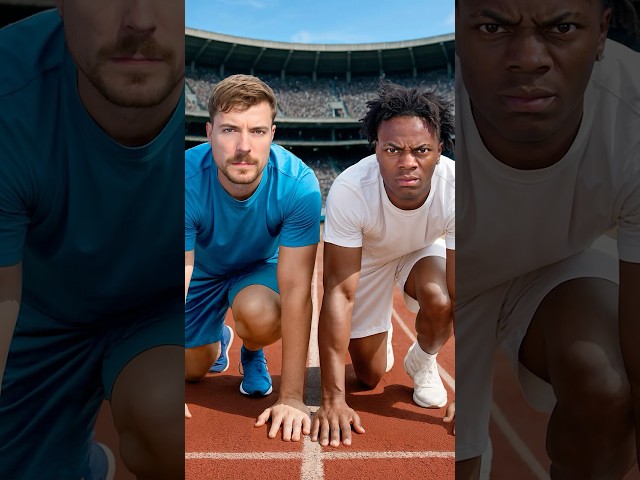
Example: I Raced IShowSpeed, by MrBeast. Standard Quality JPEG checked on . The crop is a visual demonstration, not a separate file produced by the downloader.
At the original height of 480 pixels, a 9:16 crop is 270 pixels wide. Centering that crop keeps the middle 270 pixels and removes 185 pixels from each side of this 640-pixel-wide file. This suits the central subjects in this example, but it could cut off a subject positioned near an edge in another thumbnail.
A vertical display crop does not create a new full-resolution source image or extract a different frame from the Short. Try the original link in our Shorts thumbnail downloader to see the complete downloadable file.
How to Remove Thumbnail Black Bars Without Stretching
- Compare the available files first. A widescreen variant may already provide the composition you need.
- Keep the original download. Work on a copy so you can recover content removed by the crop.
- Choose a crop ratio in your image editor. Use 16:9 for a landscape result or 9:16 for a vertical result.
- Position the crop yourself. Inspect faces, text, logos, and the edges before accepting it.
- Save a new file and inspect it. Check it at the size where you will actually use it.
Use fit/contain when keeping the whole image matters most; the frame may have empty space. Use fill/cover when filling the frame matters most; some image area will be hidden. Stretching changes proportions, so a face can look too narrow or too wide. Cropping never restores detail that was not present in the original file.
The illustrated crops on this page are display examples. ThumbGrab’s existing Download button saves the source thumbnail; use an image editor if you want a cropped file. Thumbnail images remain the work of their original creators.